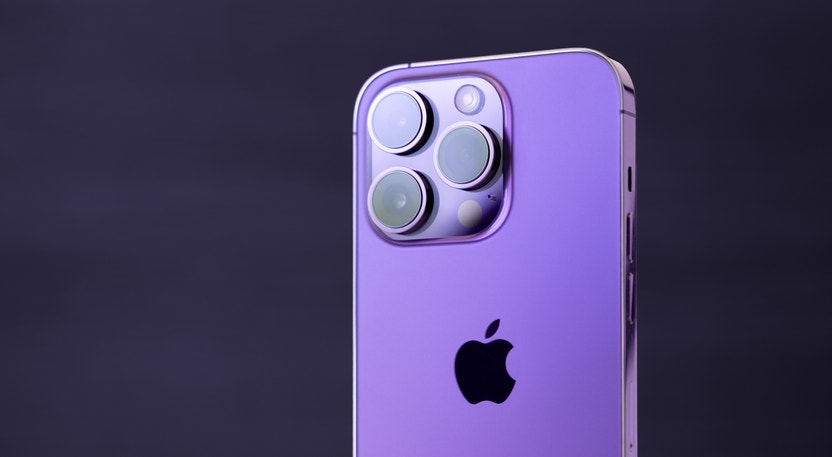

Striving for the moon? With iPhone 15’s enhanced lunar photography capabilities, you might just land among the stars! While historically lagging behind Androids in nightscape photography, the iPhone has made remarkable strides. Despite jests about the iPhone’s astro-photography limitations, you can now capture seemingly impossible shots using the latest iPhone 15 series.
Shaping Digital Age Photography
Smartphone photography has carved its niche amidst the digital revolution, accentuated by the burgeoning prevalence of social media platforms. Amongst various subjects, moon photography has emerged as a captivating yet formidable challenge to conquer.
The Evolution of iPhone Cameras
Since its 2007 debut, the iPhone has pioneered smartphone standards. Its ascendancy owes much to the evolution of its camera, which has consistently redefined mobile photography.
From the modest 2-megapixel camera in its inaugural model, the iPhone has consistently pushed the envelope. The iPhone 4 debuted the first front-facing camera, while the iPhone 5 introduced a sapphire crystal lens cover for clearer photos. Subsequently, the iPhone 6 Plus ushered in optical image stabilization, enabling sharper images in low-light conditions.
Today, the iPhone 15 lineup flaunts a dual-camera system (triple in the Pro models), featuring a 48-megapixel wide camera and a 12MP ultrawide camera equipped with Night mode, Deep Fusion, and Smart HDR 3. These advancements enable superior low-light and high-detail photography.
Furthermore, the iPhone 15 Pro models boast a LiDAR Scanner, enriching AR experiences and facilitating Night mode portraits. Offering ProRAW, these models grant users unprecedented control over image processing while harnessing Apple’s computational photography advantages.
Navigating Moon Photography Hurdles
At first glance, capturing the moon might seem as straightforward as aiming your camera skyward and clicking a button. However, disillusionment greets those who attempt this feat. The moon’s luminosity against a dark expanse confounds automatic exposure settings, risking overexposure or underexposure. Moreover, the moon appears diminutive despite its psychological magnification, presenting an additional complication when photographing it, particularly with a smartphone.
The moon’s significant distance further complicates matters, necessitating considerable zoom for detailed shots. Environmental factors such as light pollution, cloud cover, and atmospheric turbulence can further impede successful moon photography. Nevertheless, adept techniques and settings can still yield captivating moon photos using iPhone 15 devices.
See Also: Should I Buy iPhone 14 Or Go For iPhone 15?
Preparation for Lunar Photography with iPhone 15
Securing that perfect moon shot entails more than brandishing your iPhone 15 and clicking: meticulous planning is imperative. Familiarize yourself with the moon’s phases and opportune photography windows. While full moons typically entice with their luminosity, other phases offer distinct photographic prospects.
- Understanding The Moon’s Phases And Best Times For Photos
Evolving throughout the month, the moon’s phases present varied photography potentials. A full moon bathes the surroundings in its brightest glow, whereas a crescent moon imparts an enigmatic aura to photographs. The “golden hour,” occurring before sunset or after sunrise, furnishes optimal lighting for moon photography.
- Essential Gear For Lunar Photography
While iPhone 15’s camera is formidable, supplementary gear augments lunar photography. A tripod is indispensable for stabilizing your phone during low-light or long-exposure shots. In its absence, a flat surface or smartphone holder can suffice. Additionally, a telephoto lens attachment amplifies lunar details by enabling proximity to the moon.
Achieving Lunar Photographic Finesse with iPhone 15: A Step-By-Step Guide
Step I: Prepping Your iPhone for the Shot
Initiate by disengaging the flash, an inconsequential feature for lunar photography that may impede your shot. Ensure your lens is immaculate, free from any blemishes that could taint your capture.
Step II: Tailoring Camera Settings for Lunar Photography
Invoke your iPhone’s native camera app and select the utmost zoomed-in lens. If a telephoto lens attachment is available, deploy it for optimal results.
Step III: Insights on Focusing and Zooming
To crystallize a pristine moon shot, focus by tapping the moon on your screen. Employ the AE/AF Lock feature by tapping and holding to secure the focus. Exercise restraint in zooming, mindful that excessive digital zoom can diminish image quality.
Mastering Moon Photography with Your Smartphone
Unveiling the Exposure and Sundial Features
Once you’ve zeroed in on the moon, the next step is to manipulate the exposure. By lowering the sun icon beside the focus box, you can darken the moon, revealing intricate details. A recent viral TikTok video advocates setting the exposure to 2.0 and zooming in as much as possible to achieve stunning lunar details. The ability to bring the moon closer to earth is now in the palm of your hands.
Enhancing Your Moon Shots through Post-Processing
Post-processing is where the magic happens. Apps like Adobe Lightroom and Snapseed are equipped with robust editing tools for enhancing contrast, brightness, and other elements of your moon photos. Elevate your lunar shots from good to great with just a few taps and swipes, uncovering the moon’s captivating allure.
Apple vs. Samsung: Optimal Device for Moon Photography
The ongoing debate between Samsung and Apple extends into the realm of moon photography. Samsung’s “Space Zoom” feature boasts the ability to capture intricate moon details. However, recent discussions question the authenticity of these images, suggesting that the device supplements details that were initially absent. On the contrary, Apple’s method offers a more straightforward approach, allowing users to capture the moon as the naked eye sees it, with the option of refining the shot through editing. Navigating this debate involves considering whether you prefer your moon shots served with or without a touch of digital embellishment.
Tips for Perfect iPhone Moon Photography
Capturing the perfect moon shot with your iPhone 15 amalgamates knowledge of lunar behavior, meticulous planning, and the finesse of post-processing. With these tips and techniques, you unlock the potential to capture the moon in all its resplendence, utilizing the formidable capabilities of your iPhone 15. Photography is indeed a blend of science and art, beckoning you to explore diverse settings and angles for that flawless moonlit portrait. The cosmos is waiting. Happy shooting!
iPhone Moon Photography FAQs
-
Why are my moon photos blurry?
- This could be due to incorrect focus or camera shake. Utilize a tripod and the self-timer function to minimize shake and ensure crystal-clear lunar images.
-
Can I capture the moon’s details with my iPhone 15?
- Absolutely! By following the aforementioned tips and leveraging the right photo editing apps, you can effectively capture and enhance the mesmerizing details of the moon, all with the convenience of your iPhone 15.
-
Do I need additional equipment for moon photography with my iPhone 15?
- While your iPhone alone is capable of lunar photography, the addition of a tripod can enhance stability and precision. Furthermore, consider employing a telephoto lens attachment for expanded zoom capabilities, ensuring your lunar masterpieces leave nothing to the imagination.
-
What is the best time to photograph the moon?
- The ideal time often hinges on the moon’s phase. However, the “golden hour” post-sunrise or pre-sunset frequently yields picturesque lighting conditions, presenting the moon in its most enchanting splendor.
Editor’s Note: Artificial intelligence augmented the composition of this article.
For more captivating content on consumer tech, explore Benzinga’s array of articles.
Read Next: Anticipated iOS 17 Features for the iPhone at Apple’s WWDC 2023